MIKHMON MIKROTIK CSV Voucher Generator
🆕 NEW FEATURE: MIKHMON CSV Upload
Upload multiple CSV files from MIKHMON and generate vouchers automatically!
CSV Format Instructions
Expected CSV Header: Username, Password, Profile, Time Limit, Data Limit, Comment
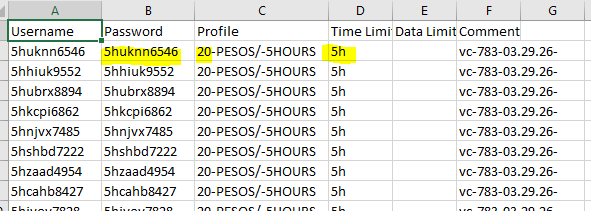
Data Extraction Rules:
- Code: Will be fetched from the Password column (Column B)
- Price: Will be fetched from the Profile column (Column C) - extracts digits before the first dash
Example: "350-PESOS/-30DAYS" → Price = 350 - Time: Can be extracted from two sources:
- Option 1: From Time Limit column (Column D) with format:
- m = minutes (e.g., "30m" → "30 minutes")
- h = hours (e.g., "5h" → "5 hours")
- d = days (e.g., "1d" → "1 day")
- Option 2: From Profile column if Time Limit is empty
Example: "350-PESOS/-30DAYS" → Time = "30 days"
- Option 1: From Time Limit column (Column D) with format:
Note: You can upload multiple CSV files at once. All data will be combined before generating vouchers.